Everything included in a ListingWebStudio website

Every feature of a ListingWebStudio website for brokerages and real estate teams, and which of the three plans carries it.

Pages that open instantly

Custom-coded pages served from the edge, 90+ PageSpeed guaranteed, even on a listing page loaded with photos.

The problem it removes

A buyer taps a listing from their phone on a school run, the gallery takes six seconds, and they are back in the search results before your page finishes painting.

What you have to do

Nothing. You never compress a photo or install a caching plugin; the pipeline resizes every image on the way in.

Why speed is the first feature on a brokerage site

A brokerage site carries more images than almost any other kind of small business site: a gallery per listing, times however many listings are active. Every page is custom coded, ships almost no JavaScript, and is served from Cloudflare's global edge with images resized and delivered at the size the visitor's screen actually needs. That is what keeps a 24-photo listing page opening as fast as the homepage, on the day the site goes live rather than after someone audits it later.

What this looks like on a listing page specifically

The first photo above the fold loads first and at the right resolution for the device; the rest of the gallery loads as the visitor scrolls to it, not all at once. Map embeds and virtual tour links load only when a visitor reaches that part of the page. None of this requires you to compress your own photos before uploading them: the pipeline handles it on every listing, every time a listing is added or updated.

What a fast page changes about paid traffic

Google Ads scores the landing page experience of every ad as part of its ad quality assessment, and its own help documentation names load speed and relevance as inputs (Google Ads Help, "About landing page experience", accessed 2026). A faster, more relevant page can therefore lower what you pay for the same click, and it keeps more of the clicks you have already paid for from bouncing before the page appears. We will not promise a percentage: the mechanism is the claim, not a number.

Included on: Listing Desk, Brokerage Floor, Portfolio Scale

A page for every listing

Active, under-offer and sold listings each get their own page, laid out as a bento grid of mixed tile sizes rather than one repetitive template.

The problem it removes

Your inventory lives inside a search widget, so a buyer who searches the address by name lands on a portal listing instead of yours.

What you have to do

Give us the feed once. Listings appear, change and retire on their own after that.

What a listing page needs to do

A listing page has one job: answer the questions a buyer has before they call, and give an agent a page worth sharing. That means the price, status, specs, photos, map and the assigned agent are all above the point where a visitor gives up scrolling, and every listing gets its own indexable URL rather than living only inside a search widget that search engines cannot crawl.

The bento layout, specifically

Listings are laid out as unequal tiles rather than a uniform card grid: a featured or new listing gets a larger tile, a price-reduced listing gets a badge tile, and the rest sit at a consistent size underneath. On the listing page itself, the same logic applies to photos, specs and the agent card, so the page reads as a designed product rather than a stretched template with the address swapped.

Where the data comes from

Listing data is pulled from your IDX or MLS feed and rendered into these pages automatically, so a status change or price change on the feed appears on the site without anyone editing a page by hand. If you keep an inventory outside the feed, such as pocket listings or new construction units, those are added directly and behave the same way on the front end.

Display rules your board expects

Attribution lines, the required IDX disclaimers and any fields your board asks you to suppress are built into the template rather than pasted at the bottom of a page. We configure them from your board's own rules during onboarding, which keeps the display side of your feed agreement tidy without you rechecking every page.

Included on: Listing Desk, Brokerage Floor, Portfolio Scale

A page for every market you cover

One page per city, town or neighborhood you serve, built for the searches buyers actually run before they contact a brokerage.

The problem it removes

Your website claims a service area in one sentence, so nothing on it can rank for the town names your agents actually work in.

What you have to do

Name the markets at onboarding. We write and build the pages, then keep the listing counts current.

Why a shared search filter is not the same as a page

A dropdown filter on a single search page is invisible to search engines and to the buyer who searched "homes for sale in [neighborhood]" and landed somewhere else. A market page is a real, indexable page: a description of the area, the current listing count pulled live from your feed, nearby amenities where relevant, and a path into the listings themselves.

How many pages, and how they are organized

We build one page per market you name during onboarding, typically the cities, towns and named neighborhoods your listings actually fall in rather than every zip code in a metro area. Pages are organized so a large metro gets a hub page linking to its neighborhood pages, which is what keeps a hundred-listing brokerage from ending up with a hundred nearly identical pages competing with each other.

What we will not write on a market page

Market pages describe places, housing stock, amenities and inventory. They never characterize the people who live in an area, never rate a neighborhood as better or worse for any group, and never imply who should or should not buy there. That is not a style preference: it is how a market page stays on the right side of fair housing rules, and it is the same standard your own agents are held to.

Included on: Listing Desk, Brokerage Floor, Portfolio Scale

A roster page for every agent

Every agent on the team gets a real profile page with their own listings, specialties and contact path, not a single shared "our agents" paragraph.

The problem it removes

A new agent joins, gets a headshot on a shared team page, and generates nothing from the website for the next year.

What you have to do

Send a photo, a short bio, specialties and where their enquiries should land. The page is live inside your plan's revision turnaround.

What an agent profile page carries

Each agent gets a page with a photo, a short bio, their license information where you choose to publish it, the specialties or markets they focus on, and a live list of their current listings pulled from the feed. Enquiries from that page route to that agent specifically, which is the detail that makes a fifteen-agent site actually work as fifteen agents' worth of enquiries rather than one shared inbox.

How the roster page ties it together

A single roster page lists every agent as a card linking to their profile, filterable by market or specialty on larger teams. This is the page a new team member gets added to on day one, and the page that keeps a growing team from disappearing behind a single "meet the team" paragraph written when the brokerage was five people smaller.

Included on: Listing Desk, Brokerage Floor, Portfolio Scale

Enquiries routed to the right agent, automatically

A form filled out on a listing page reaches the listing agent; a form on a market page reaches whoever is assigned to that market.

The problem it removes

Every form on the site lands in one inbox, so a showing request sits unread while the agent who owns the listing never hears about it.

What you have to do

Tell us once which CRM or inbox each agent and market uses. Reassignments later are a revision request, not a rebuild.

Why routing matters more than a single inbox

A brokerage site generates enquiries from many different pages at once: a specific listing, a market page, an agent profile, or the general contact form. Sending all of it to one inbox means someone has to read every message and manually forward it, which is where response time goes from minutes to hours. Every enquiry carries the page it came from and the agent it belongs to, and routes there directly by API, Zapier or Make.

What you configure once

During onboarding you tell us which CRM or inbox each agent and each market uses, and we wire the routing rules once. Adding an agent later, or reassigning a market, is a single revision request rather than a rebuild.

What reaches your CRM with the enquiry

The listing or page the enquiry came from, the assigned agent, the market, and the referral source travel with the message, so your CRM can report on which pages actually produce business rather than showing a column of untagged web leads.

Included on: Listing Desk, Brokerage Floor, Portfolio Scale

The listing lifecycle board

A real status board tracing a listing from coming-soon through active, under offer and sold, and what the page shows at each stage.

The problem it removes

A listing goes under offer on the MLS on Friday and your website is still asking for offers on Tuesday.

What you have to do

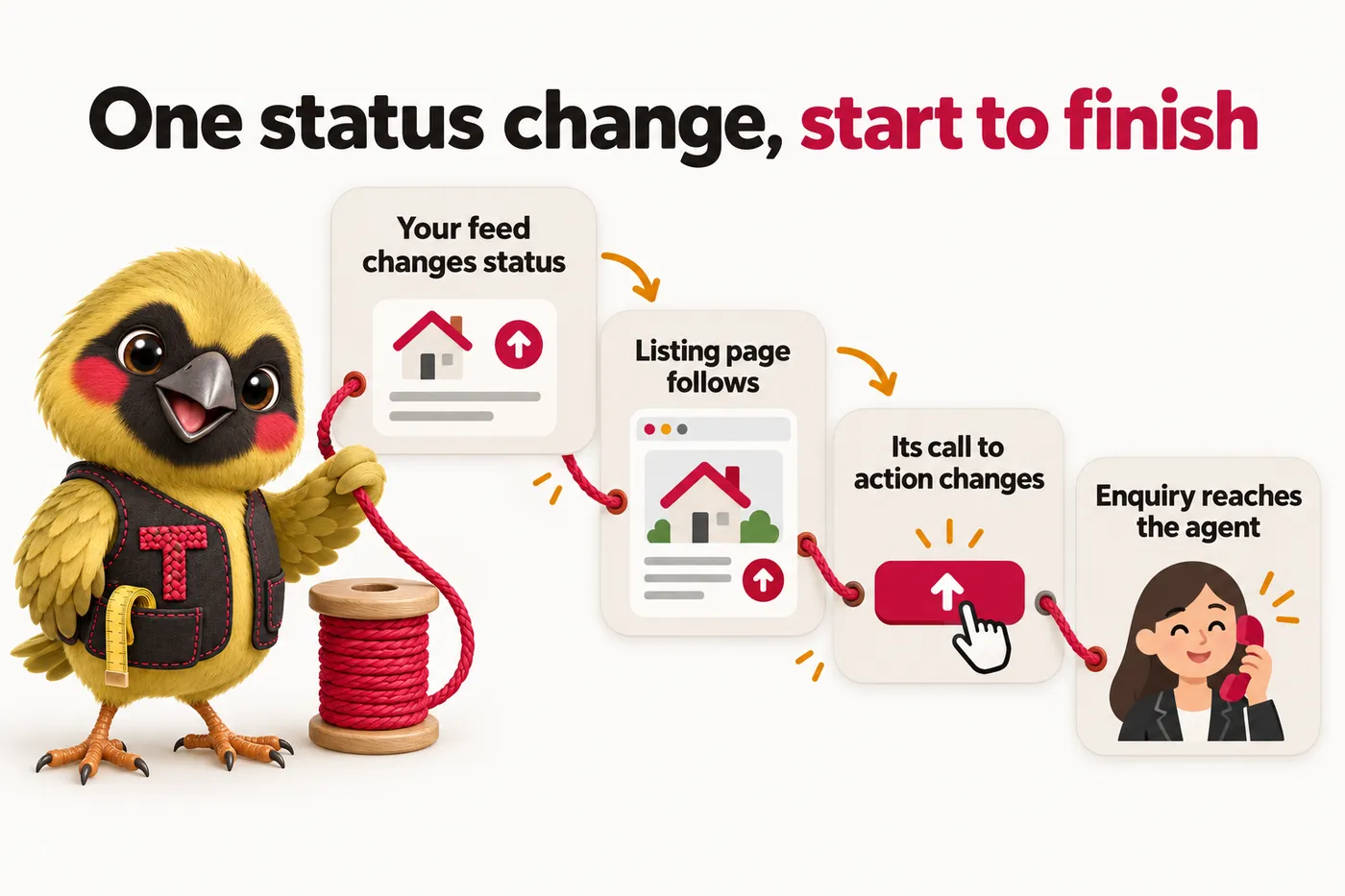
Nothing. Your feed reports the status and the page changes itself.

Why a listing is not one static page

A listing page has to say something different depending on where the listing is in its life: a coming-soon listing needs an interest-capture form because it cannot take showings yet, an active listing needs the full gallery and a schedule-a-showing call to action, an under-offer listing needs to stop soliciting offers while staying visible for search traffic, and a sold listing needs to close the loop and point to similar active inventory instead.

How the board runs on the site

The status your feed reports drives which version of the page template renders, automatically: the call to action, the badge shown on bento tiles across the site, and whether the listing still appears in market page counts. Nobody has to remember to swap a page manually when a listing goes under offer or closes; the site follows the status.

What sold listings keep doing for you

A sold page stays live rather than being deleted, so the link an agent shared six months ago still works and the page keeps pulling search traffic for that street and that neighborhood. Its call to action changes to point at similar active inventory and at the agent who closed it, which turns an archive into a working page.

Included on: Listing Desk, Brokerage Floor, Portfolio Scale

Weekly detail updates

Prices, statuses, photos and market page counts get refreshed on a weekly cadence so the site never quietly goes stale.

The problem it removes

Nobody at the brokerage owns the website, so it is accurate the week it launches and slowly wrong for the two years after that.

What you have to do

Flag anything you want changed whenever you notice it. Everything else is on our schedule, not yours.

What gets checked every week

Beyond the automatic feed sync, we run a weekly pass on details that need a human eye: agent roster changes, market descriptions that reference current inventory counts, seasonal messaging, and anything flagged by you since the last update. This is separate from a revision request; it is scheduled maintenance included in every plan.

Included on: Listing Desk, Brokerage Floor, Portfolio Scale

Revisions and your client portal

Five revisions a month of any size, requested from a portal and completed in 2 to 5 working days, with extra revisions at a flat rate and no hourly billing.

The problem it removes

Your current site takes a week and a quote to change a phone number, so changes stop being requested at all.

What you have to do

Describe the change in the portal. There is no size limit on a single request and no login to the website itself to remember.

What counts as one revision

A revision is any change request you send, and there is no cap on how much goes into one. "Add these four new agents with their photos, bios and listing categories" is one revision, not four. Five are included every month on every plan, each completed within the plan's stated turnaround whatever its size, and unused ones do not roll over.

What the portal is for

Your account opens the day the site goes live. Revisions, support tickets, files you still owe us and direct messages to the team all run through it, so nothing is lost in an email thread and you can see where a request has got to. You never log in to the website itself: managing it is our job, not another system for your office manager to learn.

Included on: Listing Desk, Brokerage Floor, Portfolio Scale

Researched market articles

Two to three articles a week, cited to named sources, covering the markets and buyer or seller questions your brokerage actually gets asked.

The problem it removes

Everyone tells you to blog, nobody at the brokerage has three hours a week to research and write one, and generic filler would embarrass you in front of a seller.

What you have to do

Approve topics if you want to. If you say nothing, we publish from the research queue and link each piece to the market page it supports.

What the articles cover

Articles are written for the questions buyers and sellers search before they contact a brokerage: what a specific neighborhood is like to live in factually, how a local process such as a disclosure period works, or what a coming-soon listing means for a buyer. Every figure in an article is tied to a named, cited source. We never publish an invented statistic or a claim that reads as investment or valuation advice, because that decision belongs to you and your agents.

Cadence by plan

Tier one and tier two publish two researched articles a week at 2,500 to 3,200 words each; tier three runs the Content Engine at three articles a week, plus social image posts and short video content pulled from the same research.

How articles support the pages that sell

Each article links to the market page, listing category or agent profile it relates to, and those pages link back. That internal structure is what turns a blog from a side road into the thing that feeds your money pages, which is also why we would rather publish two well-sourced pieces a week than ten thin ones.

Included on: Listing Desk, Brokerage Floor, Portfolio Scale

SEO, AEO, GEO and structured data

Technical and on-page SEO, market pages for your own cities, answer-first content for snippets and voice, and clean entity data so AI assistants can quote you.

The problem it removes

Your site is invisible in three different places at once: in search results, in the answer boxes above them, and in whatever ChatGPT tells a seller about brokerages in your area.

What you have to do

Nothing beyond naming your markets. The technical work, the schema and the llms.txt file are ours.

SEO: the part that gets you found

Technical SEO (crawlable structure, clean URLs, correct canonicals, fast pages, XML sitemaps, no accidental noindex) and on-page SEO (one H1, unique titles and descriptions, descriptive headings, internal links with real anchor text, alt text on every listing photo). On top of that sit the market and service-area pages for your own cities and neighborhoods, which is where organic traffic from local searches actually comes from: a page that names the place can rank for the place, and a dropdown filter cannot.

AEO: being the answer, not just a result

Every significant page opens with a direct answer under its heading, uses question-shaped subheadings that match how people actually ask, and carries a FAQ block whose questions and answers are visible on the page rather than hidden in markup. That structure is what gets lifted into featured snippets, into voice answers, and into the "people also ask" panels around your listings.

GEO: getting cited by AI assistants

Assistants such as ChatGPT, Claude, Perplexity and Google AI Overviews summarise the web rather than linking a list of ten blue results. We publish an llms.txt and an expanded llms-full.txt describing the business and its key pages, keep your business name, service names and terminology identical everywhere so the entity is unambiguous, state facts plainly with dates and sources so they are quotable, and leave AI crawlers explicitly allowed in robots.txt. Nobody can guarantee an appearance in an AI answer, and we do not; this is the work that makes it more likely.

Structured data, generated rather than pasted

Organization or LocalBusiness details, Service, FAQPage, BreadcrumbList and article markup are generated from your site's own data, so the markup can never drift away from what a visitor sees. Where your feed supports it, listing pages carry listing markup too. Review markup is added only when you have real, attributable reviews to show, because marking up anything else is both a policy violation and a reason for a manual action.

Included on: Listing Desk, Brokerage Floor, Portfolio Scale

Compliance pages built in

Privacy policy, terms, cookie policy with working consent, accessibility statement, fair housing and IDX disclosure pages, written for your site rather than pasted from a generator.

The problem it removes

Your current site has a privacy policy copied from another company in 2019 and no accessibility statement at all.

What you have to do

Confirm your entity details and have your attorney read the drafts. We are not lawyers and we do not pretend to be.

Which pages ship with your site

A privacy policy written against what your site actually collects, terms of use, a cookie policy that matches the tags your consent banner gates, an accessibility statement naming the conformance target and how to report a problem, a fair housing and equal housing opportunity statement, your IDX or MLS attribution and disclaimer page, and a DMCA or copyright contact. Each is a designed page with a table of contents and a last-updated date, not a wall of text in a footer link.

What "built with compliance in mind" means and does not mean

We build to WCAG 2.2 AA as the target, carry the fair housing and IDX disclosures your board and the Fair Housing Act expect, include TCPA-style consent wording on any text message opt-in and file A2P 10DLC registration for you where messaging is enabled, and write privacy content against US state privacy laws such as the CCPA. That helps you meet those obligations. It is not legal advice and it is not a guarantee of compliance: your attorney signs off on the wording, and we will happily make their changes as a revision.

Included on: Listing Desk, Brokerage Floor, Portfolio Scale

Managed Cloudflare hosting and a free domain

SSL, CDN, DDoS protection and unmetered bandwidth included in the monthly fee, plus one domain registered in your name, with nothing itemized separately.

The problem it removes

Hosting, SSL renewals, a security plugin and a domain renewal arrive as four separate invoices from three different vendors, and one of them lapses at the worst possible time.

What you have to do

Nothing. If you already own a domain we point it at the new site and you keep it.

What is actually included

Your site runs on Cloudflare's global network. SSL certificates renew automatically, the CDN caches your listing photos close to wherever a buyer is searching from, and DDoS protection and bandwidth are both included with no overage bill. There is no separate hosting invoice at any point, on any tier.

Who owns the domain and the content

One domain is included free for as long as your plan is active, registered in your name so you own it outright, and if you ever leave we transfer it wherever you say at no charge. The content is yours too: the listing data is your feed, the photographs are yours, and the articles we publish are written for you and stay with you.

Included on: Listing Desk, Brokerage Floor, Portfolio Scale

Migration without losing your listing URLs

Your existing listing, market and agent URLs are mapped and 301-redirected, with the old site live until the new one is confirmed working.

The problem it removes

You have been putting the rebuild off for two years because the last agency broke every shared link and the phone stopped ringing for a month.

What you have to do

Give us access to the current site or a crawl of it. We do the mapping and schedule the switch for a quiet window.

How the switch actually runs

We crawl and map every existing URL before anything moves, match each one to its closest page on the new site, and put permanent redirects in place at launch so links already shared, printed, bookmarked or ranked keep working. The old site stays live until the new one is confirmed working, and the DNS change is scheduled for a low-traffic window rather than a Monday morning.

What happens to your feed during the move

The same IDX or MLS feed is reconnected to the new site during onboarding, so listing data keeps flowing without a gap. If your board takes time to process an access change, the build continues on everything else and the feed is connected as soon as access lands.

Included on: Listing Desk, Brokerage Floor, Portfolio Scale

The AI Engine: receptionist, chat and messaging

An AI receptionist that answers calls when the team cannot, a site chat widget, and AI agents on SMS, Messenger and Instagram that answer listing questions and book showings around the clock.

The problem it removes

Calls and DMs arrive at seven in the evening and on Sunday afternoons, agents are in showings, and a buyer who does not get an answer in five minutes has already messaged the next brokerage.

What you have to do

Approve what it is allowed to say. A2P 10DLC registration for text messaging is filed on your behalf during setup.

What it answers, and what it does not

The AI Engine answers factual questions about a specific listing, books showing requests, and replies to enquiries across site chat, SMS, Messenger and Instagram around the clock. It is configured not to give pricing, valuation or investment guidance and to hand any such question straight to the assigned agent, because that judgment call belongs to a licensed professional, not to us. It never discusses who a neighborhood is suitable for, which is a fair housing line we do not let a script anywhere near.

The call side, in practice

When a call comes in that nobody can pick up, the receptionist answers it with the listing details, captures what the caller wants and books the showing into the same calendar your agents already use. A call-analysis PDF summarizes every call so an agent can read the gist in about thirty seconds instead of relistening to a recording, flagging the caller's intent, the listing discussed and any follow-up promised.

What is included on tier two and above

Site chat, the AI receptionist, the SMS, Messenger and Instagram agents, the call-analysis PDF, and A2P 10DLC carrier registration filed on your behalf as part of setup. Messaging and call usage is billed at cost on top of the monthly fee, which is why tier two is quoted as a monthly figure plus usage rather than a flat number.

Included on: Brokerage Floor, Portfolio Scale

The Content Engine

Three researched articles a week plus social image posts, short video content and a managed Google Business Profile, all pulled from the same research.

The problem it removes

The brokerage has a marketing budget, no marketing hire, and a Google Business Profile nobody has posted to since it was claimed.

What you have to do

Approve the monthly plan if you want to. Assets are produced, scheduled and published for you.

What runs every week

Three researched articles a week, three social image posts a week and two short-form videos a week, produced from the same underlying research so the message across your site, your feed and your profile is the same message rather than three unrelated efforts.

Your Google Business Profile, managed

On the top plan your Google Business Profile is managed alongside the site: kept accurate, posted to, and aligned with the market pages and articles being published, which is the local pairing that makes a brokerage findable in the map results as well as the blue links.

Included on: Portfolio Scale

Tier availability at a glance

Every feature above, against the plan that carries it. The higher plans add to the plan below rather than replacing it.

FeatureListing DeskBrokerage FloorPortfolio Scale
Pages that open instantlyYesYesYes
A page for every listingYesYesYes
A page for every market you coverYesYesYes
A roster page for every agentYesYesYes
Enquiries routed to the right agent, automaticallyYesYesYes
The listing lifecycle boardYesYesYes
Weekly detail updatesYesYesYes
Revisions and your client portalYesYesYes
Researched market articlesYesYesYes
SEO, AEO, GEO and structured dataYesYesYes
Analytics, consent and conversion trackingYesYesYes
Compliance pages built inYesYesYes
Managed Cloudflare hosting and a free domainYesYesYes
Migration without losing your listing URLsYesYesYes
The AI Engine: receptionist, chat and messagingNoYesYes
The Content EngineNoNoYes

How the data actually flows

The same four-step flow runs behind every listing on the site, whatever plan you are on.

Your feed

IDX, MLS or manual entries in your client portal

Page templates

Listing, market, agent and roster pages

Lifecycle board

Status drives what each page shows

Your CRM

Enquiries routed by listing and by agent

Infographic with Twill the mascot: One status change, start to finish. Your feed changes status. Listing page follows. Its call to action changes. Enquiry reaches the agent.

What clients say these features changed

Inquiry form and response workflow for listing inquiry routing

We expected a prettier website; what we actually use every day is the new form. The form gathers listing reference, buyer question and contact preference at the start, exactly the details our follow-up messages always requested. We answer properly on the first reply far more often than we used to.

Dorothy HoughtonClient care coordinator, Relocation buyer advisory serviceRoanoke, VA

Mobile navigation and page layout for listing inquiry routing

We reviewed the draft on phones rather than a big screen, deliberately. The important details sit near the top and the inquiry button is impossible to miss. Sending the link by text during a call finally works the way it should.

Andrea FontaineInquiries coordinator, Independent residential sales agencyReno, NV

Questions about what is included

What exactly do we get for the monthly fee?

The whole site and the work that keeps it running: a page for every listing generated from your feed, a page for every market you name, a profile page for every agent, enquiry routing into your CRM, managed Cloudflare hosting with SSL and unmetered bandwidth, one free domain registered in your name, 5 revisions a month, weekly detail updates, 2 researched articles a week, analytics and consent set up, and the compliance pages your site needs. The AI Engine is added on Brokerage Floor and the Content Engine on Portfolio Scale.

What is not included?

We do not buy or manage your ad spend, we do not act as your MLS or board contact, we do not write listing descriptions for individual properties (those come from your feed or your agents), and we do not give legal, property, valuation or fair housing advice. Photography and videography of your listings is not included either. Message and call usage on Brokerage Floor is billed at what our providers charge us, on top of the monthly fee.

What does the AI Engine actually do?

It answers factual questions about a specific listing, books showing requests, and replies to enquiries across site chat, SMS, Messenger and Instagram around the clock. It is configured not to give pricing, valuation or investment guidance and to hand any such question straight to the assigned agent, because that judgment call belongs to a licensed professional, not to us.

Does the AI Engine ever give buyers or sellers advice?

No. It is deliberately scripted to stay factual: listing details, availability, showing scheduling and general process questions. Anything that reads as advice, a valuation estimate or a negotiation question is handed to the assigned agent immediately, with the conversation history included.

What is the call-analysis PDF?

On Brokerage Floor and above, every call handled by the AI Engine is summarized into a short PDF so an agent can read the gist in about thirty seconds instead of relistening to a recording. It flags the caller's intent, the listing discussed and any follow-up requested.

What about text messaging consent and A2P 10DLC?

On Brokerage Floor and above, where the AI Engine replies by SMS, we file A2P 10DLC carrier registration on your behalf during setup and put consent wording on any form that opts someone into text messages, in line with TCPA expectations. Your attorney should read the wording; we will make their changes as a revision.

What structured data do you add, and why does it matter?

Organization or LocalBusiness details, Service, FAQPage and BreadcrumbList markup on the relevant pages, article markup on every post, and listing markup on listing pages where your feed supports it. It is generated from the site's own data rather than typed separately, so it cannot drift from what a visitor sees. Review markup is added only when you have real, attributable reviews, because marking up anything else risks a manual action.

What do the researched articles actually cover?

Market and neighborhood questions your buyers and sellers search before they contact your brokerage: what a specific neighborhood is like factually, how a local process such as a disclosure period works, or what a coming-soon listing means for a buyer. Every figure is tied to a named, cited source, and we never publish an invented statistic or a valuation claim, because that judgment belongs to your agents.

What happens to page speed as our listing count grows?

Page speed stays guaranteed at 90+ regardless of how many listings are live, because listing photos are resized and delivered at the resolution each visitor's screen needs rather than loaded at full size, and pages are generated from your feed rather than hand-built one at a time.

What happens if the site goes down or the feed breaks?

Feed health is monitored rather than discovered by a customer: an outage is flagged and chased with your provider. The site itself is static and served from Cloudflare's edge, which is why there is no database to fall over and no plugin update to break a listing page at midnight. If something is wrong, raise it in the portal or email us and a person responds within one working day.
See every feature running on real listings

Book a demo and we walk through a build close to your brokerage's size.

Book a demo