Listings live only inside a third-party search widget, so search engines and buyers searching by address never find the page.
A website built to carry every listing your brokerage has active, not just the ones on the homepage
A residential brokerage website earns its keep by giving every active listing its own indexable page and every agent their own roster page, instead of hiding inventory behind a single search widget.
What usually goes wrong for residential brokerages
A site built for one agent gets awkward once a fifth or tenth agent joins, and the roster becomes an afterthought paragraph.
Status changes on the MLS take days to reach the website because someone has to update pages by hand.
Enquiries from a listing page land in one shared inbox instead of reaching the agent who actually owns that listing.
The pages your site will carry
- Home
- Listings (bento grid, all statuses)
- One page per active listing
- Agent roster
- One page per agent
- Market pages by city or neighborhood
- About the brokerage
- Contact
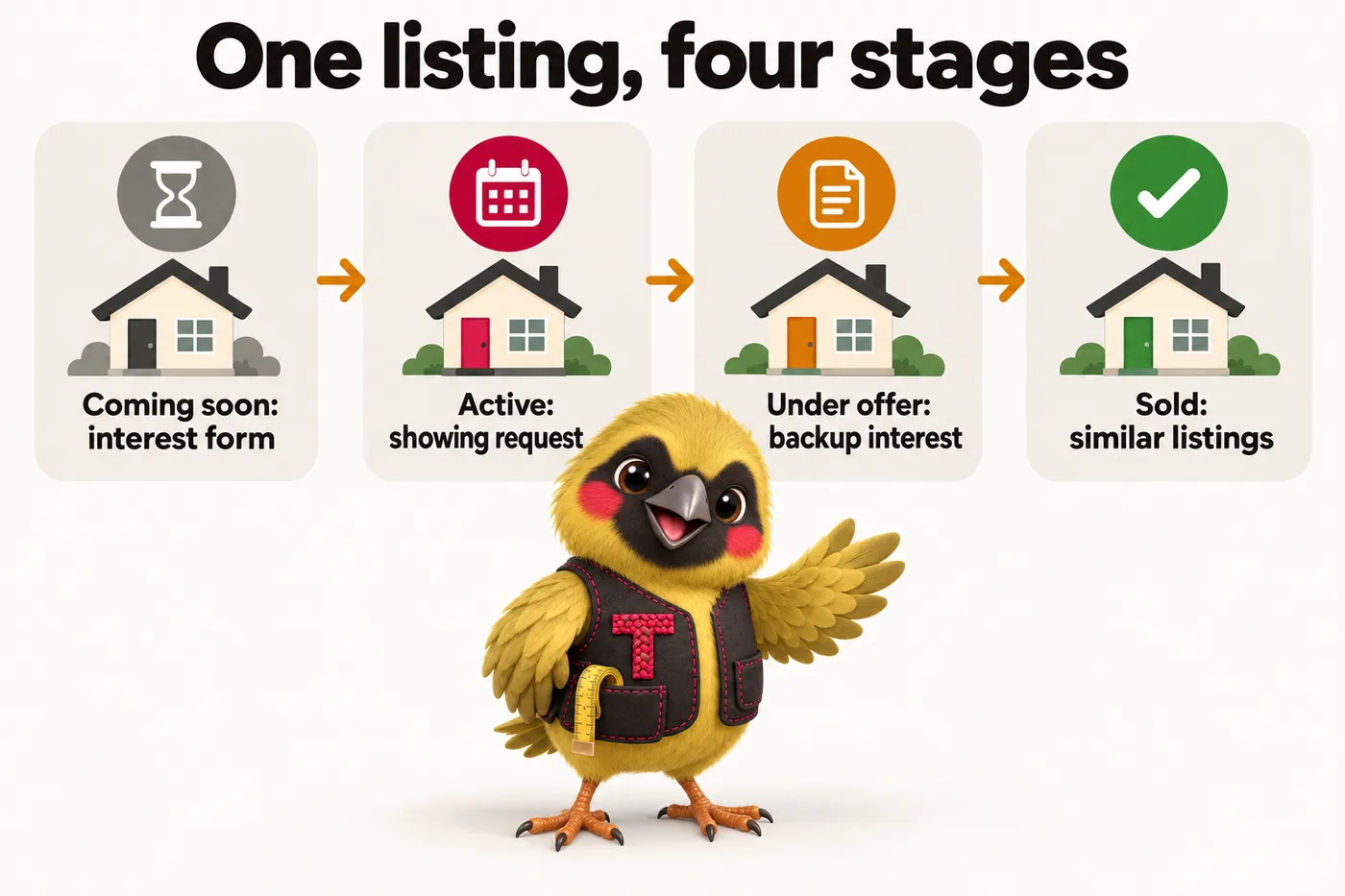
Listing lifecycle board
Every listing page follows a coming-soon, active, under-offer or sold state pulled from your feed, and the page itself changes what it asks a visitor to do at each stage.
Built on the same listing lifecycle board used across every ListingWebStudio site.
See how it worksThree ways to run it
Listing Desk
The website, fully managed, live in 7 days
Brokerage Floor
Everything, plus the AI Engine, live in 10 days
Portfolio Scale
Everything, plus the Content Engine, live in 15 days
What clients say about the change
Inquiry form and response workflow for listing inquiry routing
We expected a prettier website; what we actually use every day is the new form. The form gathers listing reference, buyer question and contact preference at the start, exactly the details our follow-up messages always requested. We answer properly on the first reply far more often than we used to.
Dorothy HoughtonClient care coordinator, Relocation buyer advisory serviceRoanoke, VA
Mobile navigation and page layout for listing inquiry routing
We reviewed the draft on phones rather than a big screen, deliberately. The important details sit near the top and the inquiry button is impossible to miss. Sending the link by text during a call finally works the way it should.
Andrea FontaineInquiries coordinator, Independent residential sales agencyReno, NV
Questions from residential brokerages
Can the site handle a hundred or more active listings?
Yes. Listing pages are generated from your IDX or MLS feed rather than built by hand, so a hundred listings and a thousand listings cost the same amount of setup work and the same page speed.
Do we lose our current listing URLs if we switch?
No. We map your existing listing and market URLs to the new site structure and add 301 redirects, so links already shared or ranked keep working.
How long does the build take for a brokerage our size?
Seven days on the entry plan, ten or fifteen on the higher plans, counted from the onboarding call. Because listing, market and roster pages are generated from your feed rather than drawn one at a time, a twelve-agent brokerage and a sixty-agent brokerage take the same time.
What do we have to supply?
Your IDX or MLS feed details, a photo and short bio per agent, your logo, the markets you want pages for, and where enquiries should land. The onboarding form takes about twenty minutes and anything missing can follow later without holding up the build.
Who updates the site after launch?
We do. Five revisions a month of any size, completed in 2 to 5 working days, plus a weekly pass over listing data, roster changes and market copy. Nobody at your office needs a login.
How do enquiries reach our agents?
Routed by the page they came from: a listing enquiry to the listing agent, an agent page enquiry to that agent, market and general enquiries by the rule you set. They land in your CRM by API, Zapier or Make, tagged with the page.
Do we get market pages for every town we cover?
One page per market you name at onboarding, with live listing counts from your feed. We keep them to the places you genuinely cover, because thin near-duplicate pages hurt a domain rather than helping it.
What does it cost, and when is the build fee charged?
You pay the first monthly invoice to start, and the one-time build fee is invoiced only after your site is live and you have approved it. Domain and hosting are inside the monthly figure, with no separate bills.
Not quite the shape of your operation?
The same structure carries every kind of inventory. These are the other builds, each with its own pages and its own tool.
Real estate teams
A real estate team website works when every member of the team has a real profile and a real slice of the site's traffic, rather than the whole site pointing back to the team lead alone.
See the buildProperty management companies
A property management company website works when rental units and any sales listings are structured differently from the start, because a renter and a buyer are searching for different things and expect different pages.
See the buildNew construction developers
A new construction website needs pages built around communities and phases, where unit availability changes constantly and every unit shares specs with dozens of others rather than being one-of-a-kind.
See the buildCommercial brokerages
A commercial real estate website works when a listing page carries square footage, zoning, lease type and cap rate fields that a residential template was never built to show.
See the buildMulti-office franchise brokerages
A multi-office brokerage website works when each office has its own page, its own agent roster and its own local listings, sitting inside one consistent brand rather than one office dominating the homepage.
See the buildLuxury portfolio brokerages
A luxury brokerage website works differently from a high-volume one: fewer active listings need more visual space each, with a bento layout that gives a flagship property a full-width tile instead of squeezing it into a uniform grid.
See the build
Drag or scroll sideways for the rest
See it built for residential brokerages
A live walk-through, on your screen, of the site you would get.
Book a demo